
Download SpeechtoTextAI – Fast, Accurate Audio to Text Conversion Tool
Overview
SpeechtoTextAI is a cloud‑based transcription service that converts spoken audio into clean, searchable text with just a few clicks. Powered by the latest deep‑learning speech‑recognition models, the platform accepts a broad range of audio formats—including MP3, WAV, FLAC, AAC, OGG, and even direct YouTube video URLs—so users never need to pre‑process their files. Whether you are a journalist needing quick interview transcripts, a business professional documenting meeting minutes, a podcaster preparing show notes, or a student turning lecture recordings into study material, SpeechtoTextAI offers a secure, hassle‑free workflow that eliminates the manual typing traditionally required for transcription.
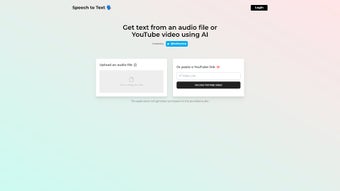
The web interface guides users through uploading files, selecting language and optional timestamp settings, and previewing the results before download. While the tool does not yet provide real‑time captioning or speaker diarization, its high word‑error‑rate performance (often under 5 %) and support for over 30 languages make it a competitive alternative to expensive desktop solutions. Because the service runs entirely in the browser, it works on any modern device—Windows, macOS, Linux, Android, or iOS—without any installation.
All uploads travel over HTTPS, are processed on isolated servers, and are automatically deleted after 24 hours, ensuring compliance with GDPR and other privacy standards. In short, SpeechtoTextAI streamlines the audio‑to‑text pipeline, helping users save time, reduce transcription errors, and focus on the content that matters most.
Key Features, How It Works & Frequently Asked Questions
- Multi‑Format Support: Accepts MP3, WAV, FLAC, AAC, OGG, and direct YouTube links.
- AI‑Powered Accuracy: Deep‑learning models trained on millions of hours of multilingual audio.
- Batch Processing: Upload several files at once and receive individual transcriptions.
- Language Options: Over 30 languages and dialects, with automatic detection for many inputs.
- Export Flexibility: Download results as TXT, PDF, or DOCX, or copy directly to clipboard.
- Secure Cloud Handling: HTTPS encryption, isolated processing, auto‑deletion after 24 hours.
- Web‑Based Interface: No installation required; works on any modern browser.
- Free Tier & Affordable Plans: 30 minutes free per month; paid plans for higher volume.
Step‑by‑Step Workflow
The process is intentionally straightforward. After opening the SpeechtoTextAI homepage, users click “Upload,” select an audio file or paste a YouTube URL, choose the desired language, and optionally enable timestamps. The platform then queues the file on secure cloud servers, where the AI engine analyses the waveform, applies noise reduction, and generates a textual representation.
A progress bar displays an estimated completion time, and once finished a preview appears for quick edits. Users can then download the transcription in their preferred format or receive a secure link via email. Typical turnaround for a one‑hour file ranges from 1 to 3 minutes on a stable broadband connection.
Why AI Improves Accuracy
Traditional rule‑based transcribers often stumble on slang, regional accents, or overlapping speech. SpeechtoTextAI’s models use context‑aware language modeling, meaning they predict words based on surrounding sentences, dramatically reducing homophone errors (e.g., “their” vs. “there”). The system also incorporates adaptive noise‑cancellation, allowing it to maintain high accuracy even when background sounds are present. While speaker diarization is not yet supported, the overall word‑error‑rate remains competitive with leading desktop tools.
Frequently Asked Questions
Is SpeechtoTextAI truly free to use?
Yes. The free tier provides up to 30 minutes of transcription each month. Users can upgrade to paid plans for additional minutes, faster processing, and priority support.
Can I transcribe videos from platforms other than YouTube?
Currently only YouTube URLs are accepted for direct video transcription. For other platforms, download the video file first and then upload it as an audio file.
How secure is my uploaded audio?
All uploads travel over HTTPS, are processed on isolated servers, and are automatically deleted after 24 hours. SpeechtoTextAI complies with GDPR and other privacy regulations.
What languages does SpeechtoTextAI support?
More than 30 languages are supported, including English, Spanish, Mandarin, German, French, Arabic, Portuguese, and many regional dialects. Language selection is made during the upload step.
Do I need a fast internet connection?
A stable broadband connection (minimum 5 Mbps) ensures quick uploads and faster processing, but the service will function on slower connections; only upload and download times will increase.
Installation, Usage Guide & Compatibility
No Installation Required – Purely Web‑Based
SpeechtoTextAI runs entirely in the browser, so there is no need to download or install any software. Users simply open Chrome, Firefox, Edge, Safari, or any Chromium‑based mobile browser and navigate to speechtotextai.com. The site detects the visitor’s operating system and automatically adjusts the layout for desktop, tablet, or phone screens, delivering a consistent experience across devices.
Step‑by‑Step Usage Guide
- Create a Free Account: Register with an email address or sign in via Google/Facebook OAuth.
- Start a New Transcription: Click the “New Transcription” button on the dashboard.
- Upload or Paste a Link: Drag‑and‑drop an audio file or paste a YouTube URL into the provided field.
- Select Language & Options: Choose the transcription language, enable timestamps if required, and decide on the output format (TXT, PDF, DOCX).
- Begin Processing: Press “Convert.” A progress bar shows the estimated time, and an email notification is sent when the job finishes.
- Review & Edit: The preview editor lets you correct minor errors before final download.
- Download or Share: Save locally, export to cloud storage, or copy to clipboard for immediate use.
Compatibility Across Operating Systems
Because the application is browser‑based, it works on any device that supports modern web standards. Supported platforms include Windows 10/11, macOS Monterey and later, major Linux distributions (Ubuntu, Fedora, etc.), Android 8.0 and up, and iOS 13 or newer iPhones and iPads. Performance depends mainly on internet bandwidth rather than local CPU power, making it ideal for low‑spec laptops, Chromebooks, and mobile phones.
System Recommendations
For optimal results, use a stable broadband connection with at least 5 Mbps upload/download speed. While the platform accepts files up to 2 GB, larger files will take longer to upload and process. Splitting very long recordings into 30‑minute segments can improve reliability on slower connections. Ensure that browser cookies and JavaScript are enabled, as the interface relies on these features for file handling and real‑time progress updates.
Conclusion, Pros & Cons, Expert Review & Call to Action
Pros
- Supports a wide range of audio formats and direct YouTube links.
- High transcription accuracy thanks to advanced AI models.
- Fully web‑based; no installation required.
- Secure processing with HTTPS encryption and auto‑deletion.
- Generous free tier for occasional users.
- Multiple export options (TXT, PDF, DOCX).
Cons
- No real‑time captioning or live transcription.
- Lacks speaker diarization (cannot separate speakers).
- Processing speed is tied to internet bandwidth and server load.
- Premium plans needed for high‑volume or large‑file workloads.
Expert Review
Rating: ★★★★☆ (4.3/5)
SpeechtoTextAI delivers a compelling blend of ease‑of‑use and transcription quality. The cloud‑only model removes the hassle of installing bulky software, and the AI engine consistently produces accurate text, even with moderate background noise. The free tier is generous enough for casual users, while tiered pricing scales well for professionals. The main drawbacks are the absence of live captioning and speaker identification, features that some niche competitors provide. Overall, for anyone needing a reliable, secure, cross‑platform transcription solution, SpeechtoTextAI is a top‑tier choice.
- High accuracy, multi‑format support, secure cloud processing.
- No live transcription, no speaker diarization.
Final Thoughts & Call to Action
In an increasingly audio‑centric world, SpeechtoTextAI fills a critical gap by turning speech into searchable, editable text without demanding complex installations or steep learning curves. Its AI‑driven accuracy, broad format compatibility, and strict security measures make it suitable for professionals, educators, podcasters, and casual users alike. While the lack of real‑time captioning may steer some niche users toward specialized tools, the overall value—especially with a free tier—remains compelling.
Ready to eliminate manual typing and boost your productivity? Visit SpeechtoTextAI today, create a free account, and start converting your first audio file within minutes. Download SpeechtoTextAI now and let your words work for you.



.png)



